
Portfolio values and yield metrics are estimates based on available data. Actual results may differ based on token prices, liquidity, trading activity, fees, rewards, slippage, transaction costs, and market conditions.
Accessing Your Portfolio
1
Visit the Portfolio page
Go to orca.so/portfolio.
2
Connect your wallet
Click Connect Wallet and approve the connection.
3
View your positions
Your positions load after your wallet is connected.
What’s on the Portfolio Page
The Portfolio page shows two top-level tabs:- Liquidity Positions — Your concentrated liquidity positions across Whirlpools
- Vault Positions — Your deposits into managed Vaults
A Harvest All button next to Pending Yield lets you submit a transaction to collect accrued fees and rewards from eligible positions.
Three sub-tabs let you scope the view:
- Positions — Active LP positions
- History — Historical activity for your positions
- Closed Positions — Positions that have been fully closed
Position row columns
Each position row displays:
A ⋯ button on the right opens the position action menu.
Position Action Menu
The ⋯ menu on each position row gives you access to position actions: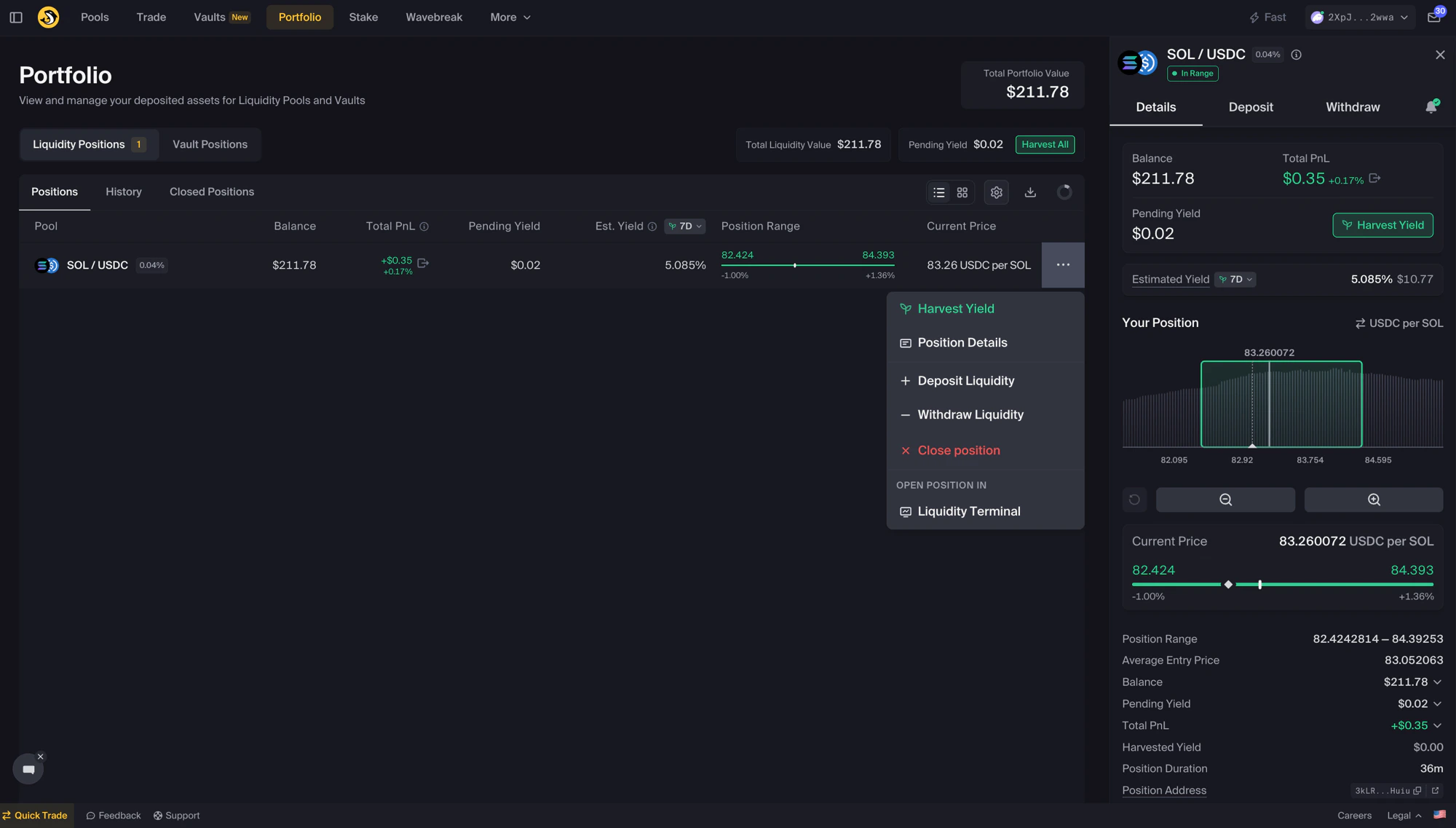
Click the ⋯ on a position row to open the action menu; the Position Details sidebar opens on the right
Position Details Sidebar
Review Details, Deposit, and Withdraw tabs, plus alerts
Harvest Yield
Use Harvest Yield to collect accrued fees and rewards
Add Liquidity
Add more liquidity to an existing position
Withdraw Liquidity
Remove some or all liquidity from a position
Understanding Position Status
In Range
The current price is within your selected range. The position may accrue swap fees when swaps use your liquidity.
Out of Range
The current price is outside your selected range. The position does not accrue swap fees while it is out of range.
Understanding Position NFTs
Liquidity positions are represented by NFTs. Each position has one unique NFT in your wallet that represents ownership of that position.
Why this matters
- Whoever holds the NFT controls the position it represents
- Transferring the NFT transfers control of the position
- If the NFT is burned, you lose access to the position it represents
Transferring positions
To move a position to another wallet:- Transfer the position NFT to the new wallet.
- The new wallet can manage the position.
- The original wallet loses access to the position after the NFT is transferred.
- Moving a position to a hardware wallet
- Moving a position to a multisig
- Transferring ownership of a position
Reviewing Position Metrics
What each metric means
The Portfolio page and Position Details sidebar surface these fields. Names below match labels in the app.
The first six appear on each position row in the list. The full set is visible in the Details tab of the Position Details sidebar.
Comparing LP position value with holding
The Portfolio shows estimated position metrics, including accrued and harvested yield. It does not fully determine how the position compares with simply holding the deposited tokens outside the pool. A simplified comparison may consider:Position review considerations
Monitoring frequency
Monitoring frequency
How often you review a position may depend on range width, token volatility, position size, and your own preferences.
You can set up alerts for selected position conditions.
Harvest timing
Harvest timing
When reviewing whether to harvest, consider:
- Accrued fees and rewards
- Network fees and transaction costs
- Whether you are already making another position change
- Tax or record-keeping needs
When users may review or adjust positions
When users may review or adjust positions
Users may review or adjust positions when:
- A position is out of range
- Token composition has changed
- Pool conditions or market conditions have changed
- Fees or rewards have changed
- The user wants to withdraw, add liquidity, or create a new range
Troubleshooting
Position not showing
Position not showing
- Check wallet connection — Reconnect if needed.
- Refresh the page — Wait for data to load.
- Verify correct wallet — Ensure you are using the address that holds the position NFT.
- Check NFT ownership — The position NFT must be in the connected wallet.
Incorrect values displayed
Incorrect values displayed
- Refresh the page — Values can change as data updates.
- Check network status — Solana RPC issues can cause delays.
- Clear browser cache — Cached data may show stale values.
Can't interact with position
Can't interact with position
- Verify NFT ownership — The position NFT must be in the connected wallet.
- Check SOL balance — SOL is required for transaction fees and any account costs.
- Review network conditions — Network congestion can cause transaction failures or delays.
Security Tips
Protect NFTs
Do not sell, transfer, or burn position NFTs unless you intend to transfer ownership or give up access
Review Wallet Setup
Consider your wallet setup carefully, especially for larger positions
Verify Transactions
Always review transaction details before approving
Avoid Scams
Be cautious of links from DMs and requests to transfer or burn NFTs
Important reminders
- Portfolio values and yield metrics are estimates and can change.
- Fee and reward accrual are not guaranteed.
- Positions only accrue swap fees while in range and used by swaps.
- Position NFTs represent ownership of liquidity positions.
- Burning or transferring a position NFT can result in loss of access to the position it represents.
- Review all wallet prompts before signing transactions.
Next Steps
Position Sidebar
Review quick actions for position management
Harvest Yield
Use Harvest Yield to collect accrued fees and rewards
Add Liquidity
Add more liquidity to an existing position
Position Alerts
Set up notifications for selected position conditions