Close a liquidity position and withdraw available funds.
Close a liquidity position by withdrawing available liquidity and any accrued fees.
Closing a position withdraws available position balances and harvests accrued fees as part of the close flow. The position NFT may also be burned, depending on the option selected.
Locate the position you want to close in your positions list.
3
Open the position menu
Click the … (ellipsis) button on the right side of the position.
Click the ellipsis menu to see position actions
4
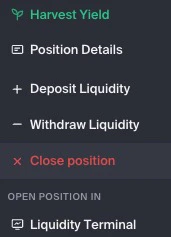
Select Close Position
Choose × Close Position from the dropdown menu.
5
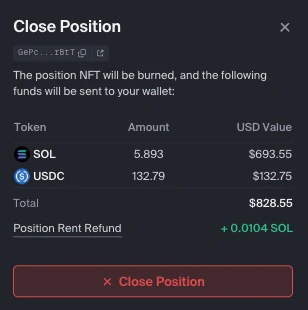
Review the details
A confirmation modal shows:
Estimated tokens to receive
Accrued fees to be harvested
Whether the position NFT will be burned
Review what you are expected to receive before confirming
6
Confirm and close
Click Close Position, then review and approve the transaction in your wallet.
Review the estimated token amounts, accrued fees, slippage setting, NFT burn setting, and wallet transaction details before approving. Final received amounts may vary based on pool conditions and transaction execution.
When closing, you may be able to choose whether to keep or burn the position NFT.
Burn NFT
Burning the NFT closes the position NFT after liquidity is withdrawn and accrued fees are harvested.Select this only if you do not intend to reuse the same position NFT.
Keep NFT
Keeping the NFT preserves the position NFT in your wallet after liquidity is withdrawn.This may let you deposit back into the same position parameters later.
The position NFT represents ownership of the position. Do not burn, sell, or transfer it unless you intend to close, transfer, or permanently give up access to the position it represents.
Keeping the NFT may allow you to add liquidity back to the same price range later without creating a new position.
You can also fully close a position from the Withdraw tab in the Position Details sidebar:
Open the Position Details sidebar.
Go to the Withdraw tab.
Use the slider, click Max, or set the amount to 100%.
Tick the Harvest and burn the NFT of this position checkbox to fully close the position. Without this checked, you withdraw available liquidity, but the position NFT stays in your wallet.
Click the action button at the bottom and approve the transaction in your wallet.
With the checkbox ticked, this path withdraws available liquidity, harvests accrued fees, and burns the position NFT when the transaction completes.